Best Audio Interface (2026): 5 Picks Compared
Updated Oct 23, 2026 · By  Jonah Mercer · Ranked from listed specifications · How we rank
As an Amazon Associate I earn from qualifying purchases. Buying through the Amazon links on this page costs you nothing extra. Full disclosure
The Focusrite Scarlett Solo 3rd Gen leads this list for most home recording: one XLR mic preamp, one instrument input and 24-bit/192kHz conversion in a small USB-C box. If you need to record two microphones at once, the MOTU M2 is the pick, since it is the only one here with 2 mic preamps.
The picks at a glance
Which one should you buy?
- Singer-songwriters recording vocals and guitar one at a time: Focusrite Scarlett Solo 3rd Gen USB-C Audio See pick 1More picks: Best Audio Interface for Recording Vocals
- Podcasters recording two hosts on separate mics: MOTU M2 USB-C Audio Interface See pick 2More picks: Best Audio Interface for Recording
- Podcasters and streamers who move their setup between rooms: M-AUDIO M-Track Duo USB Audio Interface Dual See pick 3
- Home recordists who want the current Scarlett generation: Focusrite Scarlett Solo 4th Gen USB-C Audio See pick 4
- Streamers who want loopback to mix computer audio: Piyone Audio Interface See pick 5
Narrow it down
- Best Audio Interface Under $100
- Best Audio Interface Under $150
- Best Audio Interface Under $200
- Best Audio Interface Under $300
- Best Audio Interface for Beginners
- Best Audio Interface for Live Performance
- Best 12 Channel Audio Interface
- Best Compact Audio Interface
- Best Pro Audio Interface
- Best Audio Interface for Home Studio
The 5 picks, ranked
1Best Overall
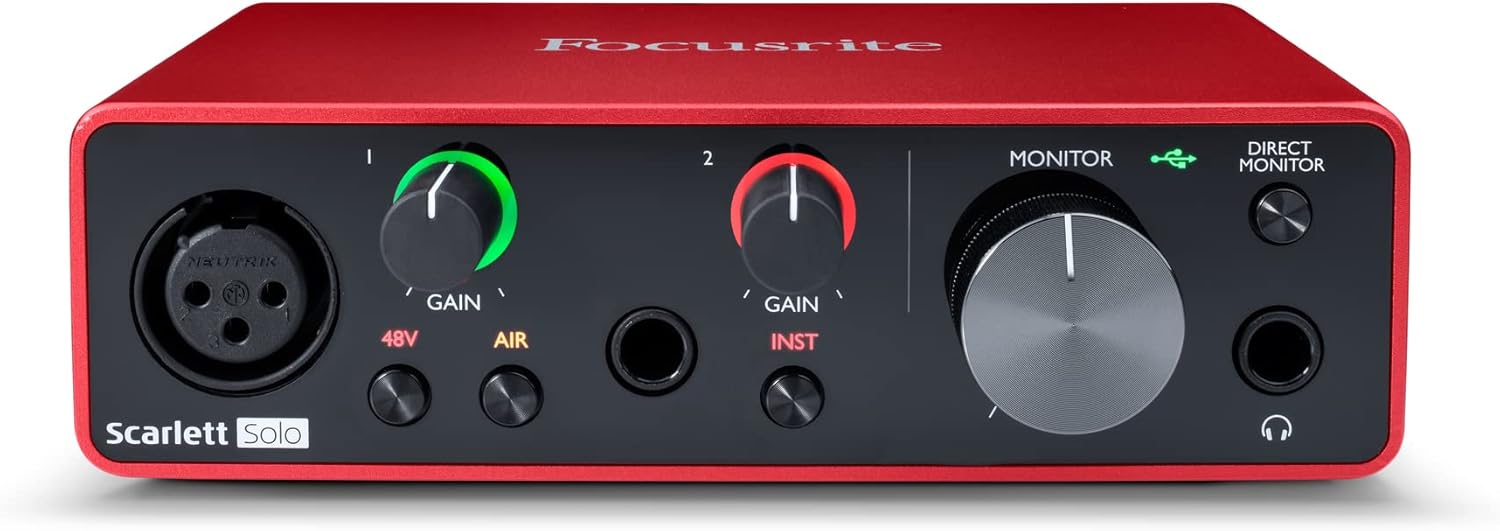
Focusrite Scarlett Solo 3rd Gen USB-C Audio
- Inputs: 2
- Mic preamps: 1
- Max sample rate: 192 kHz
- Bit depth: 24-bit
- 48V phantom power not stated in the listing
- Software named in listing: Pro Tools Intro
- 3-year warranty stated
It covers the common one-voice, one-guitar setup and ships with three recording programs named in the box.
Who it suits
- Singer-songwriters recording vocals and guitar one at a time
- Beginners who want recording software in the box
Skip it if
- You need to record two microphones at the same time
- You want MIDI ports on the interface itself
The box holds the interface and a USB-C to USB-A cable. The listing names Pro Tools Intro+, Ableton Live Lite and Cubase LE as included software, and it works with macOS, Windows and iOS. A switchable Air mode is listed for vocals and acoustic instruments.
2Most Mic Preamps

MOTU M2 USB-C Audio Interface
- Inputs: 2
- Mic preamps: 2, the most here
- Outputs: 2
- Max sample rate: 192 kHz
- Bit depth: 24-bit
- 48V phantom power not stated in the listing
- 2-year warranty stated
Two mic preamps make it the choice for interviews, duets or a two-mic drum overhead pair.
Who it suits
- Podcasters recording two hosts on separate mics
- Players who track two sources at once
Skip it if
- You only ever record one microphone
- You want a large included software suite
The M2 is a 2-in/2-out USB-C interface with hardware monitoring and 24-bit/192kHz conversion. Its spec table lists LCD meters for all inputs and outputs, a headphone output with its own volume and MIDI in and out. It runs on USB bus power with the cable included.
3Lightest Pick
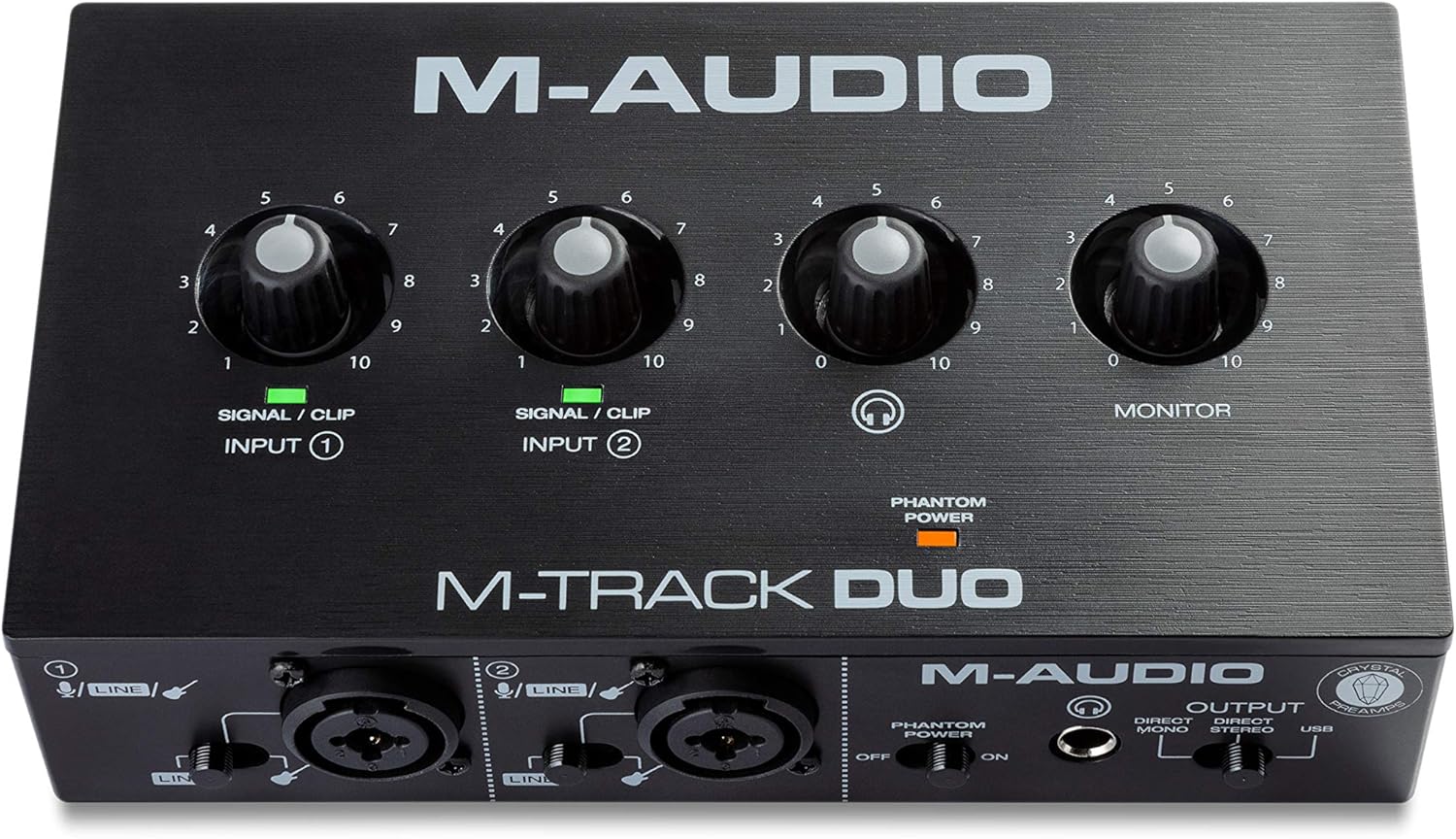
M-AUDIO M-Track Duo USB Audio Interface Dual
- Inputs: 2
- Mic preamps not stated in the listing
- Max sample rate: 48 kHz
- Bit depth not stated in the listing
- 48V phantom power
- Software named in listing: Ableton Live Lite
- 0.7 lb, the lightest here
At 0.7 lb it is the lightest interface here, with two combo inputs and phantom power for condenser mics.
Who it suits
- Podcasters and streamers who move their setup between rooms
- Users of condenser mics that need phantom power
Skip it if
- You want recording above 48kHz
- You need more than two inputs
Both inputs are combo XLR, line and instrument jacks with phantom power. A USB/Direct switch is listed for zero-latency monitoring, plus a 1/4-inch headphone output and stereo 1/4-inch outputs. Ableton Live Lite and MPC Beats are named as included software.
4Also Great

Focusrite Scarlett Solo 4th Gen USB-C Audio
- Inputs: 2
- Mic preamps: 1
- Max sample rate: 192 kHz
- Bit depth: 24-bit
- 48V phantom power not stated in the listing
- Software named in listing: Pro Tools Intro
The newer Solo keeps the same one-mic, one-guitar layout and adds a 120dB dynamic range figure.
Who it suits
- Home recordists who want the current Scarlett generation
- Guitarists who record through the Hi-Z input
Skip it if
- You already own the 3rd Gen Solo
- You need a second mic preamp
The listing quotes a 120dB dynamic range and an updated Air mode for vocals and guitars. Pro Tools Intro+, Ableton Live Lite, Cubase LE and the Hitmaker Expansion are included. The box holds the interface and a USB A-C cable.
5Also Great

Piyone Audio Interface
- Inputs: 2
- Mic preamps not stated in the listing
- Max sample rate: 192 kHz
- Bit depth: 24-bit
- 48V phantom power
A class-compliant 2x2 box with 48V phantom power and loopback for streaming from one cable.
Who it suits
- Streamers who want loopback to mix computer audio
- Laptop users who want a driver-free setup
Skip it if
- You want a well-known brand's software bundle
- You need MIDI connections
It is class compliant, so the listing says no drivers are needed on Mac or PC, and USB-C carries both data and power. Two combo jacks take XLR or TRS, with 48V phantom power and a Hi-Z mode for guitar. A 3.5mm headphone jack and direct monitoring are listed.
Side by side
| Product | Inputs | Mic preamps | Outputs | Max sample rate | Bit depth | 48V phantom power | Software named | Weight | Warranty |
|---|---|---|---|---|---|---|---|---|---|
| Focusrite Scarlett Solo 3rd Gen USB-C Audio | 2 | 1 | Not stated | 192 kHz | 24-bit | Not stated | Pro Tools Intro | 0.8 lb | 3-year |
| MOTU M2 USB-C Audio Interface | 2 | 2 | 2 | 192 kHz | 24-bit | Not stated | Not stated | 1.3 lb | 2-year |
| M-AUDIO M-Track Duo USB Audio Interface Dual | 2 | Not stated | Not stated | 48 kHz | Not stated | Yes | Ableton Live Lite | 0.7 lb | Not stated |
| Focusrite Scarlett Solo 4th Gen USB-C Audio | 2 | 1 | Not stated | 192 kHz | 24-bit | Not stated | Pro Tools Intro | 0.9 lb | Not stated |
| Piyone Audio Interface | 2 | Not stated | Not stated | 192 kHz | 24-bit | Yes | Not stated | 1.6 lb | Not stated |
How we ranked these audio interfaces
Every pick has at least 100 customer ratings on Amazon and a listing with real specifications. The order mixes two things: how each model compares on the specs below (higher share of the best value in this group scores more), and how widely it is bought. The spec score runs from 9.0 to 9.8 and only compares these picks with each other. A spec the listing does not state is left out and the other specs are re-weighted; a listing with fewer than 2 stated specs is scored at half. We do not test gear in person. Full method.
- Inputs weight 3
- Mic preamps weight 2
- Outputs weight 1
- Max sample rate weight 2
- Bit depth weight 1
- 48V phantom power weight 2
Buying advice: audio interface
Count the microphones you record at once
Inputs matter less than mic preamps. Every interface here has two inputs, but only one has two mic preamps. If you sing while playing guitar, one mic preamp plus an instrument input is enough. If two people speak into two microphones at the same time, you need two preamps.
Check phantom power before buying a condenser mic
Condenser microphones need 48V phantom power from the interface. Dynamic mics do not. Look for phantom power in the specs table above, and if a row is blank, confirm it on the maker's own spec sheet before pairing an interface with a condenser mic.
Look at what software comes in the box
A first interface can double as your first recording software purchase. Bundles differ a lot: some name three recording programs and a plugin pack. If you already own recording software, ignore the bundle and compare inputs and outputs instead.
Frequently asked questions
Do I need an audio interface to record vocals?
If you use an XLR microphone, yes. The interface powers the mic preamp and turns the signal into digital audio your computer can record.
Is 24-bit/192kHz necessary for home recording?
Most of these interfaces list 24-bit/192kHz. It gives headroom for editing, and the number of mic preamps and inputs decides what you can record at once.
Can I record guitar straight into an audio interface?
Yes. Use the instrument or Hi-Z input, which every interface in this list names, and add amp simulation in your recording software.
Gear that goes with it
 Best Condenser MicTop pick: Rode RØDE NT1 Signature Series Studio Condenser Microphone
 Best Studio MonitorsTop pick: Yamaha HS4 Powered Studio Monitor in Black
 Best Mixing HeadphonesTop pick: beyerdynamic DT 770 Pro Studio Headphones
 Best XLR CableTop pick: Cable Matters 2-Pack Premium XLR to XLR
More audio interfaces guides
Specifications and availability come from each Amazon listing on Oct 23, 2026 and can change. Check the listing before you buy.