How to Set Up Bookshelf Speakers
Updated Nov 13, 2026 · By  Jonah Mercer · Editorial policy
As an Amazon Associate I earn from qualifying purchases. Buying through the Amazon links on this page costs you nothing extra. Full disclosure
Set up bookshelf speakers by placing the powered speaker and the other speaker on stable surfaces at ear height, facing the listening position, with the powered speaker near a power outlet. Connect the speakers to each other, then connect a source by Bluetooth, optical, coaxial or line input. Switch the speakers on, select the input, and set the volume.
Place the speakers at ear height
Put each speaker on a stable surface with the tweeter at ear height when you sit in the listening position. Angle each speaker to face the listening position, and keep the powered speaker near a power outlet so its power cable reaches without strain. Leave space behind each speaker for the cables that connect it to the other speaker and to a source.
Connect the speakers to each other
Run a speaker cable from the powered speaker to the other speaker and check that each end sits firmly in its terminal. Keep a little slack in the cable so the speakers can sit in place without pulling on the connection. A loose connection can leave a speaker silent, so check each end before you move on.
Connect a source to the speakers
Pair a phone, tablet or computer by Bluetooth, or connect a TV or computer by optical or coaxial input. A line input takes a wired connection from a source with an audio output. Stay with the connection you chose, so the speakers play from the source you intend.
Switch on and select the input
Plug the powered speaker into a power outlet and switch it on, then select the input that matches the connected source. Use the remote control to switch inputs and adjust the volume without reaching for the side panel. If no sound comes out, check that the input selected matches the cable or connection in use.
Set the volume, bass and treble
Start with the volume low and raise it in small steps until the sound suits the listening position. Use the bass and treble knobs on the side panel to adjust the balance to taste. Make small changes and listen after each change, so you can tell what each control does.
What you need

Edifier R1280DB Powered Bluetooth Bookshelf Speakers
A powered Bluetooth bookshelf speaker with optical and coaxial inputs, a remote control, and bass and treble controls on the side panel.
- Power: 42 W
- Bluetooth
- 2-year warranty stated
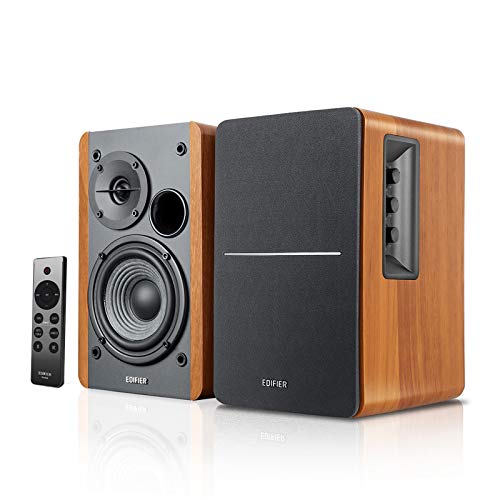
Edifier R1280DBs Active Bluetooth Bookshelf Speakers
An active Bluetooth bookshelf speaker with optical and coaxial inputs, a subwoofer output, and a remote control for volume and input switching.
- Power: 42 W
- Bluetooth
- 2-year warranty stated
- 10.8 lb, the lightest here
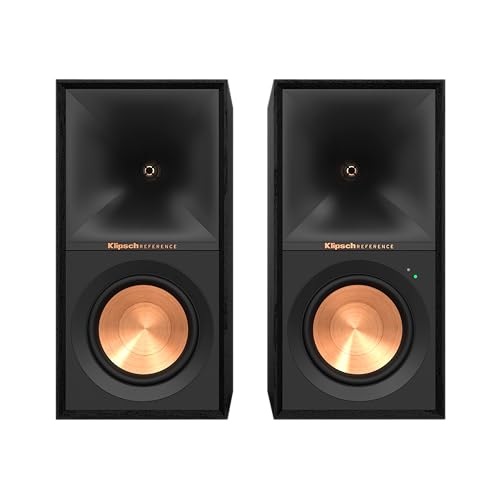
Klipsch R-50PM Powered Speakers with 5.25" Woofers
A powered speaker with 5.25-inch woofers and a 1-inch aluminum tweeter, with Bluetooth, that plugs into a power outlet and needs no separate receiver.
- Woofer size: 5.25 in
- Bluetooth
- 3-year warranty stated
These come from our ranked list Best Bookshelf Speakers, which compares them spec by spec.
Frequently asked questions
Do bookshelf speakers need an amplifier?
Powered bookshelf speakers have a built-in amplifier, so they plug into a power outlet and connect straight to a source. Passive speakers need a separate amplifier between the source and the speakers.
Can I connect bookshelf speakers to a TV?
Yes. Connect the TV to the speakers by optical or coaxial input, or pair the speakers with the TV by Bluetooth. Check that the TV sends its sound to the speakers and not to its own built-in speakers.
Why does sound come from just the powered speaker?
Check the cable between the speakers and check that each end sits firmly in its terminal. Also check the input selected on the powered speaker and the volume on the source and on the speakers.
Ranked powered speakers lists
More how-to guides
Product details come from each Amazon listing and can change. Check the listing before you buy.