How to Hook Up a Turntable to Speakers
Updated Nov 11, 2026 · By  Jonah Mercer · Editorial policy
As an Amazon Associate I earn from qualifying purchases. Buying through the Amazon links on this page costs you nothing extra. Full disclosure
Connect the turntable's RCA output to powered speakers, or pair it over Bluetooth if both the turntable and the speakers support it. If the turntable has a built-in phono preamp, set it to line for powered speakers; if it does not, connect through a phono preamp or a receiver with a phono input.
Check the turntable's outputs and preamp
Look at the back of the turntable for RCA outputs, a Bluetooth button or a built-in speaker. Check whether the turntable has a built-in phono preamp: the Audio-Technica AT-LP60XBT lists one, and a turntable without one needs a separate phono preamp or a receiver with a phono input. Note which outputs the turntable has before you buy cables or speakers, so the connection matches.
Check whether the speakers are powered
Powered speakers have their own amplifier and volume control, so a turntable connects to them directly through RCA or Bluetooth. The Audio-Technica AT-LP60XBT bundle includes powered Bluetooth studio monitors, and the Seasonlife player comes with two external speakers.
Connect with RCA cables or Bluetooth
For a wired connection, run RCA cables from the turntable's RCA output to the speakers' RCA or line input, matching red to red and white to white. The Audio Technica AT-LP60XSPBT-BK includes a dual RCA output cable for this. For a wireless connection, put both the turntable and the speakers in Bluetooth pairing mode and pair them; the Victrola Journey also streams phone audio through its built-in Bluetooth speakers.
Set the preamp and test the sound
If the turntable has a built-in phono preamp with a line/phono switch, set it to line when you connect to powered speakers, and to phono when you connect to a phono input. Put a record on, lower the volume, start the turntable and raise the volume slowly. If the sound is faint or distorted, check the RCA plugs, the preamp setting and the Bluetooth pairing before you change anything else.
What you need

Victrola Journey
A suitcase record player with built-in stereo speakers, 3-speed playback and Bluetooth, plus stereo RCA outputs for external speakers.
- Bluetooth
- Built-in speakers
- 1-year warranty stated

Audio-Technica AT-LP60XBT Bluetooth Stereo Turntable
A fully automatic turntable with a built-in phono preamp and Bluetooth, bundled with a pair of powered Bluetooth studio monitors.
- Built-in phono preamp
- Bluetooth

Audio Technica AT-LP60XSPBT-BK Wireless Turntable
A fully automatic turntable with Bluetooth and an included dual RCA output cable, plus a 3.5 mm to dual RCA cable for wired systems.
- Bluetooth
- 1-year warranty stated
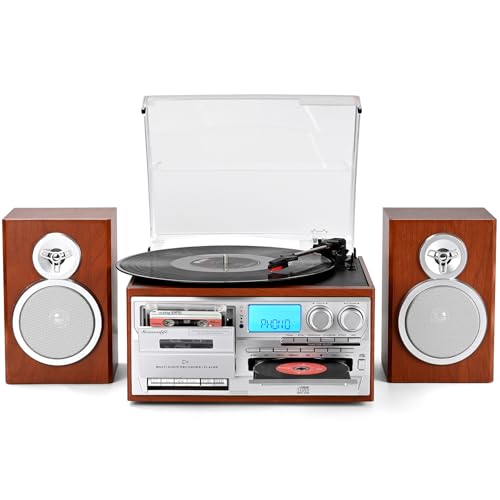
Seasonlife® 10 in 1 Record Player
A 3-speed record player with two external speakers, Bluetooth input and output, and an RCA line output for active speakers.
- Bluetooth
- Drive: Belt Drive
- 1 year warranty stated
These come from our ranked list Best Turntable with Speakers, which compares them spec by spec.
Frequently asked questions
Do I need a phono preamp to connect a turntable?
It depends on the turntable. The Audio-Technica AT-LP60XBT has a built-in phono preamp, so it connects to powered speakers directly. A turntable without one needs a separate phono preamp or a receiver with a phono input.
Can I connect a turntable to speakers with Bluetooth?
Yes, if both the turntable and the speakers support Bluetooth. The Victrola Journey, the Audio-Technica AT-LP60XBT, the Audio Technica AT-LP60XSPBT-BK and the Seasonlife player all list Bluetooth. Put both in pairing mode and pair them.
Why is there no sound from my turntable?
Check the RCA plugs, the preamp setting and the Bluetooth pairing first. Make sure the turntable is on, the speakers are on and the volume is up. If the turntable has a built-in phono preamp, check that its setting matches the input you connected to.
Ranked turntables lists
More how-to guides
Product details come from each Amazon listing and can change. Check the listing before you buy.